RevenueCat: subscriptions in Finance and Notifications
Connecting RevenueCat gives Appwin your app's subscription figures: MRR, revenue, churn, active subscribers, trials.
It is the source of almost all of the Finance product. Without it, the page stays empty and offers to connect the account.
Two complementary channels:
| Channel | Role |
|---|---|
| Get all your purchases in real time | Webhook: each purchase, renewal, or refund as soon as it happens |
| Import all your RC history | Scheduled Data Exports (S3): the full past, then a daily refresh |
The webhook only covers what happens from now on. The S3 drop also brings the past.
Settings → Projects → your app → Integrations → RevenueCat.
1. Get all your purchases in real time
In Appwin, the RevenueCat card → Get all your purchases in real time shows
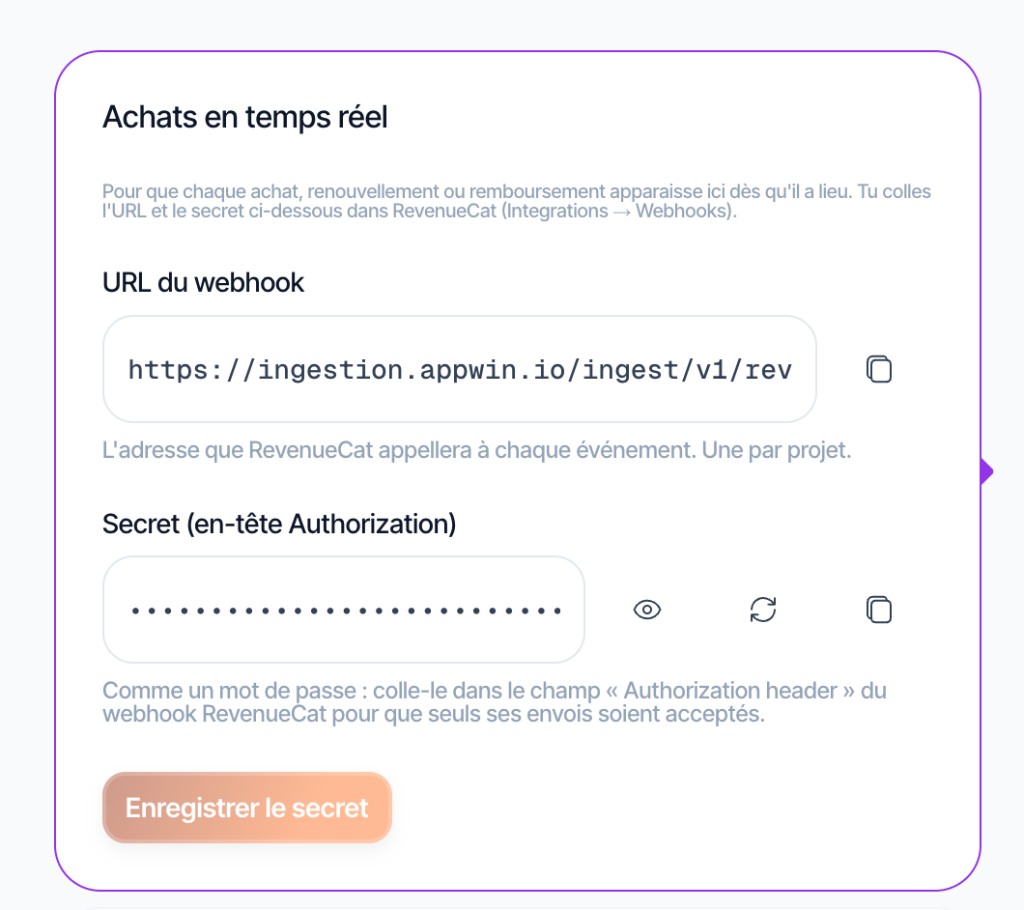
the RevenueCat project ID, the webhook URL and a secret (whsec_…
prefix). You paste the URL and secret into RevenueCat.
- 1
Copy the Project ID
Open RevenueCat, select your project, then Project settings → Project ID, and paste it into Appwin. It also appears in the RevenueCat URL:
app.revenuecat.com/projects/<Project ID>/….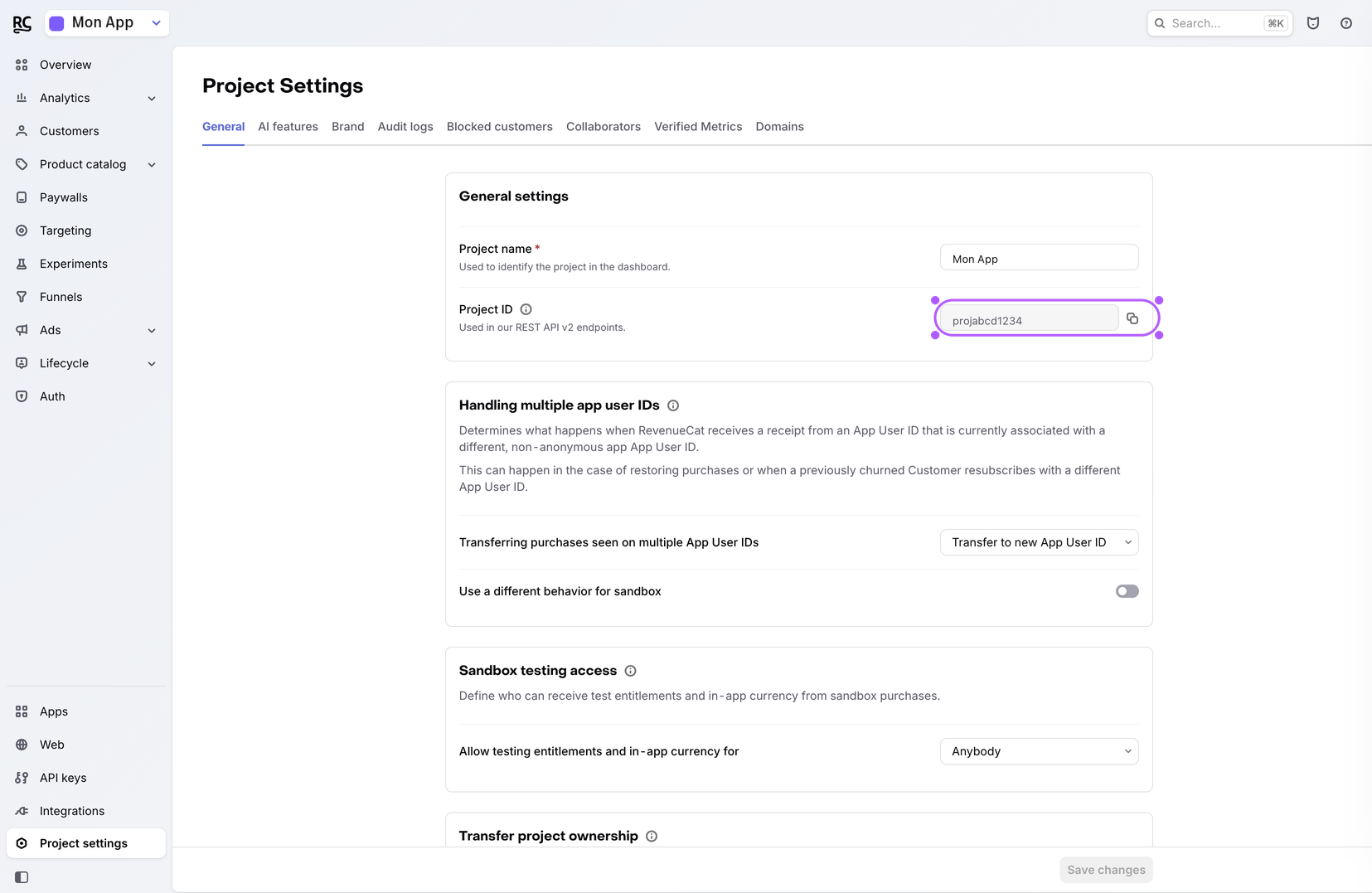
- 2
Collect URL and secret in Appwin
Generate the secret if needed, then copy the URL and secret from the card.
- 3
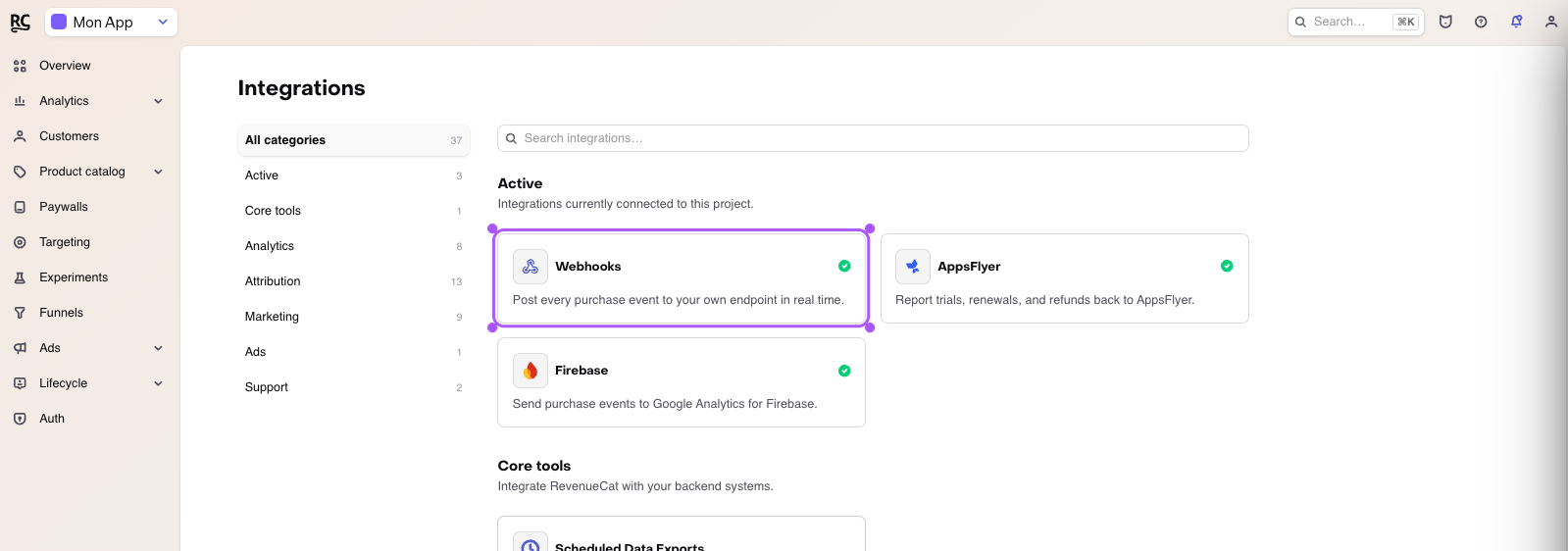
Open Integrations → Webhooks
Open RevenueCat, select your project, then Integrations, and click the Webhooks card.
- 4
Paste the URL and secret
Add a webhook. In Appwin, copy Webhook URL (shape
https://ingestion.appwin.io/ingest/v1/revenuecat/<id>) and paste it into the Webhook URL field in RevenueCat.Choose Authorization header auth and paste the secret as-is (
whsec_prefix included), then save in RevenueCat.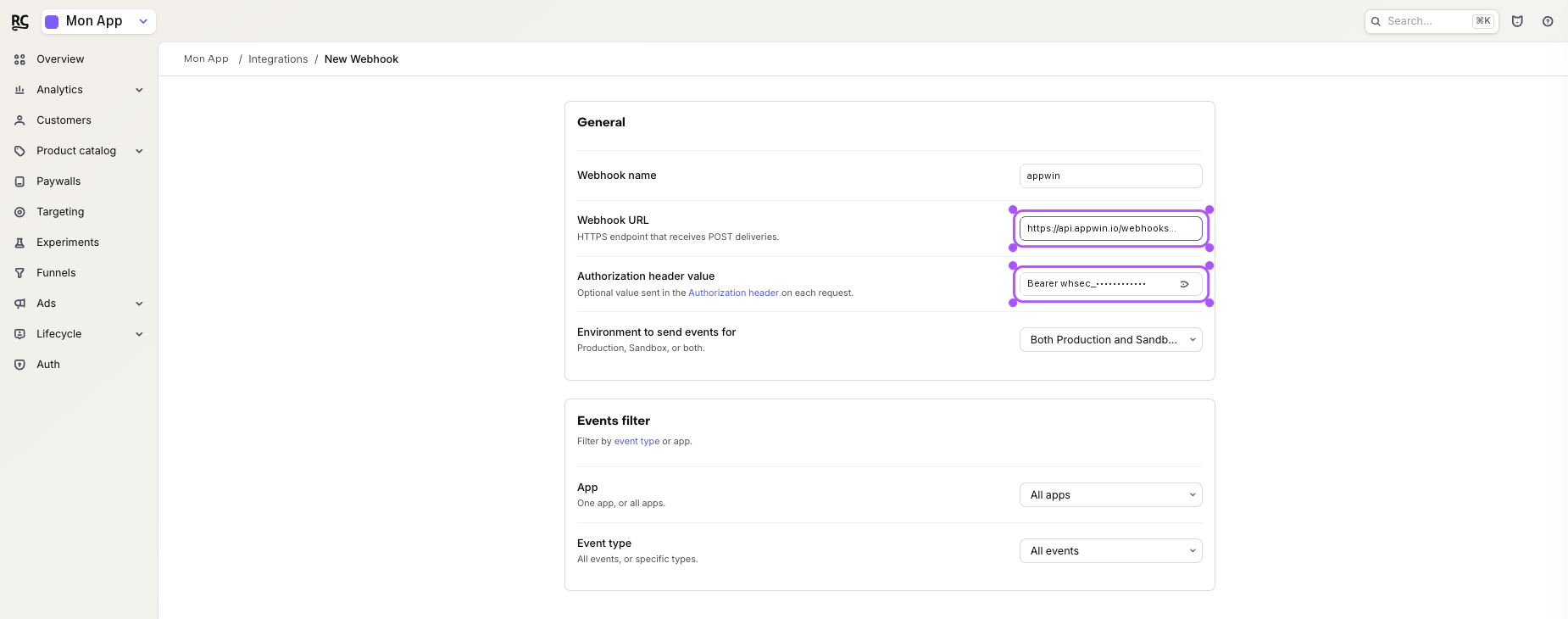
- 5
Confirm in Appwin
Once the webhook is saved in RevenueCat, click Done in RevenueCat on the Appwin card. We cannot verify delivery before the first purchase: that button only records that you finished the setup.
2. Import all your RC history
Without a scheduled export, Finance only sees events received after the webhook was activated. The S3 drop fills in the past.
Before pasting fields into RevenueCat, create the drop on the RevenueCat card → Import all your RC history → Create my S3 drop. Appwin shows Endpoint, Bucket, Access Key, Secret Key, and the bucket folder (this project's id).
- 1
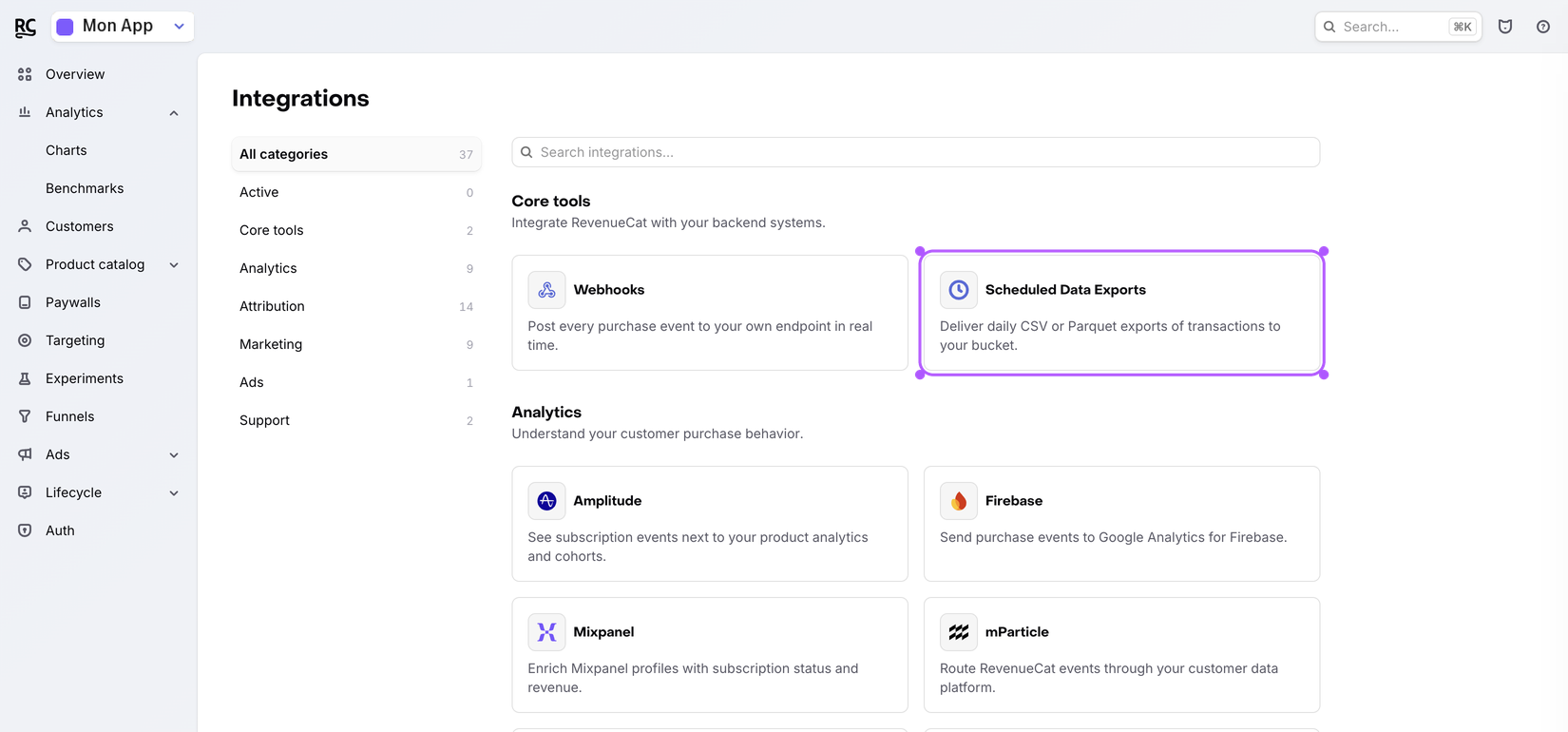
Open Scheduled Data Exports
Open RevenueCat, select your project, then Integrations and the Scheduled Data Exports card.
- 2
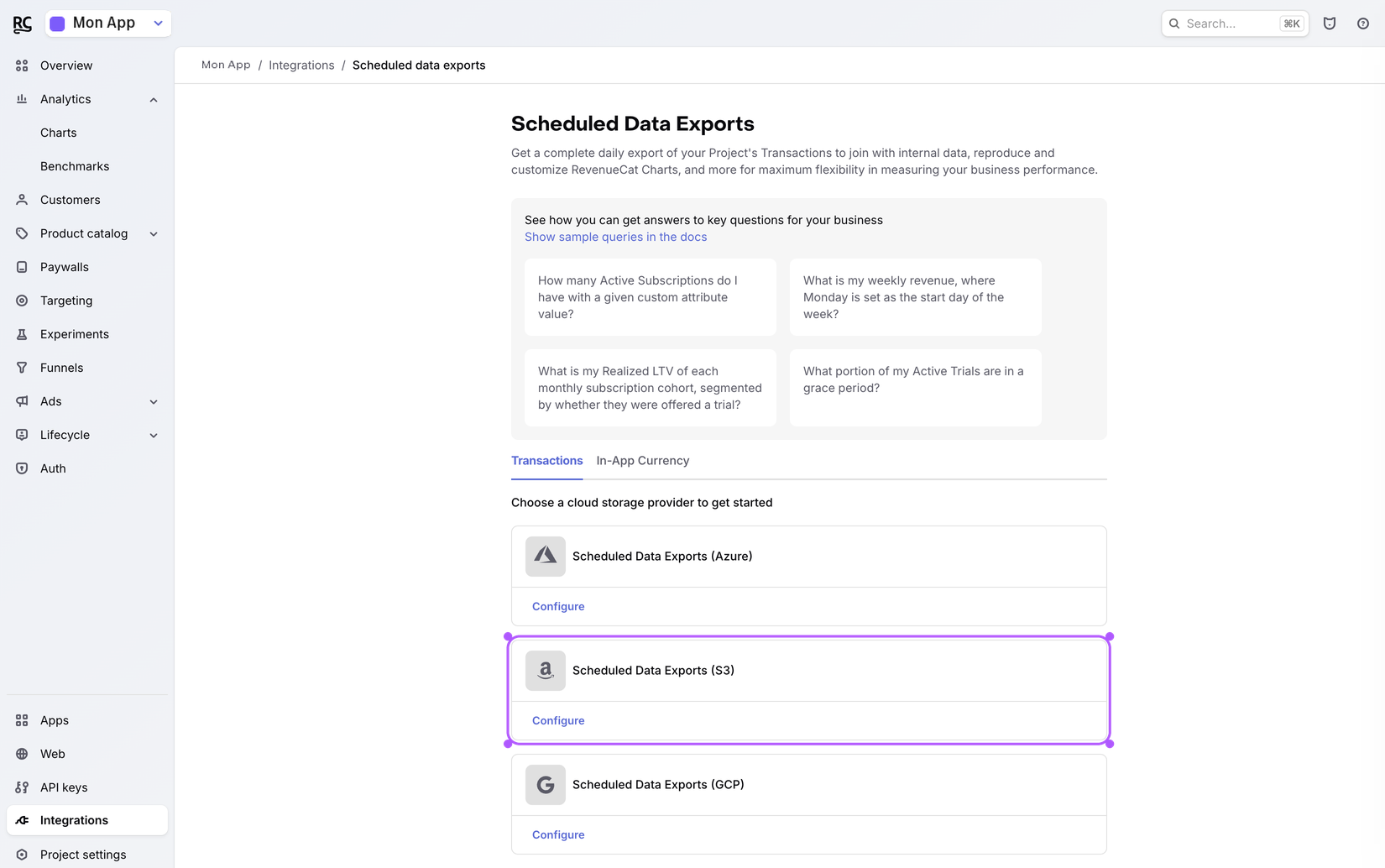
Choose S3
Under Choose a cloud storage provider, click Configure on Scheduled Data Exports (S3).
- 3
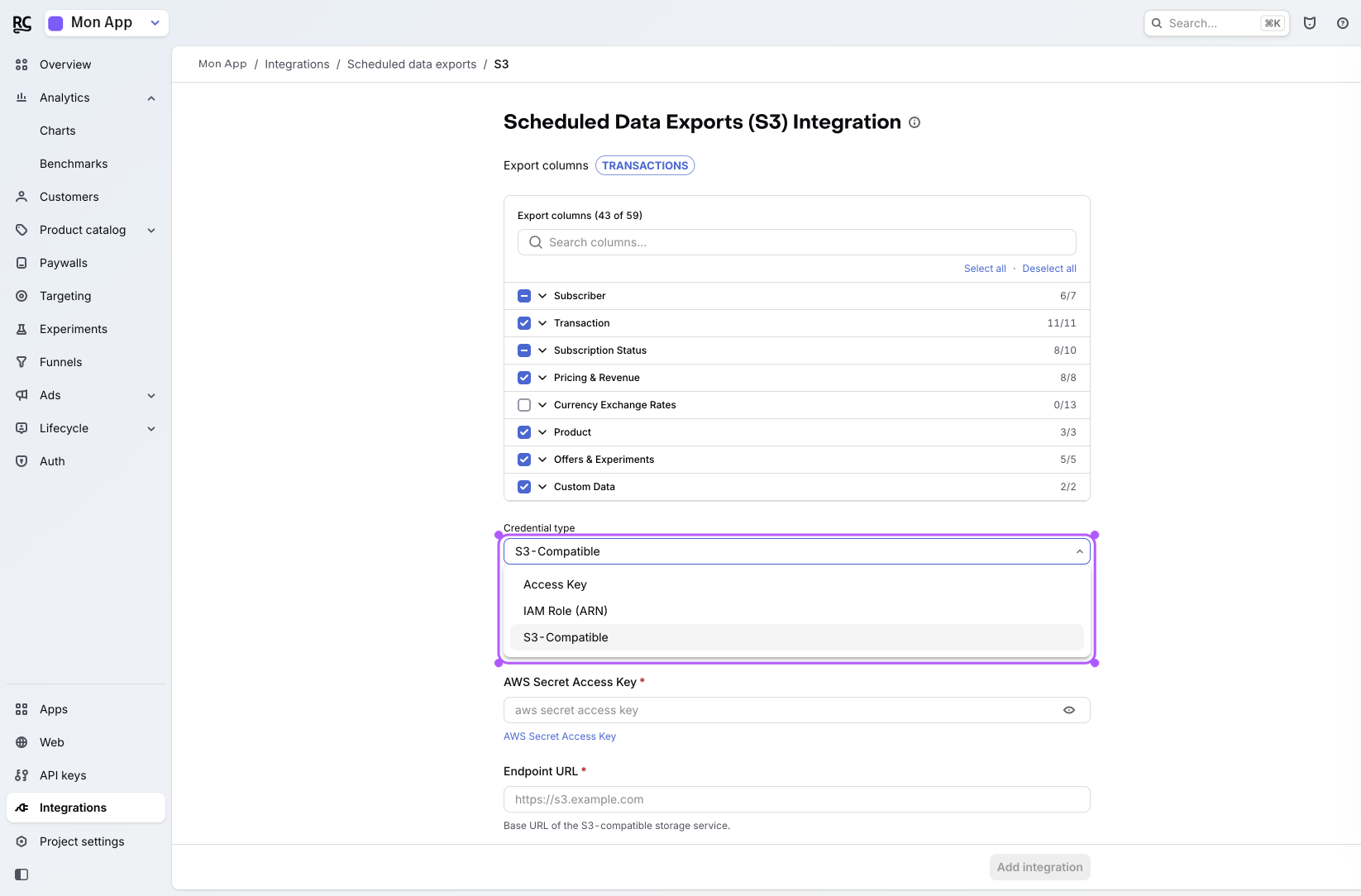
Credential type → S3-Compatible
In the form, Credential type → S3-Compatible (not classic Amazon Access Key: the Appwin drop is S3-compatible storage).
- 4
Paste the Appwin credentials
Fill with the values from the Appwin card:
RevenueCat field Appwin value AWS Access Key ID AWS Access Key ID AWS Secret Access Key AWS Secret Access Key Endpoint URL Endpoint URL Bucket name Bucket name Bucket folder Bucket folder (this project) - the project id, not an invented path 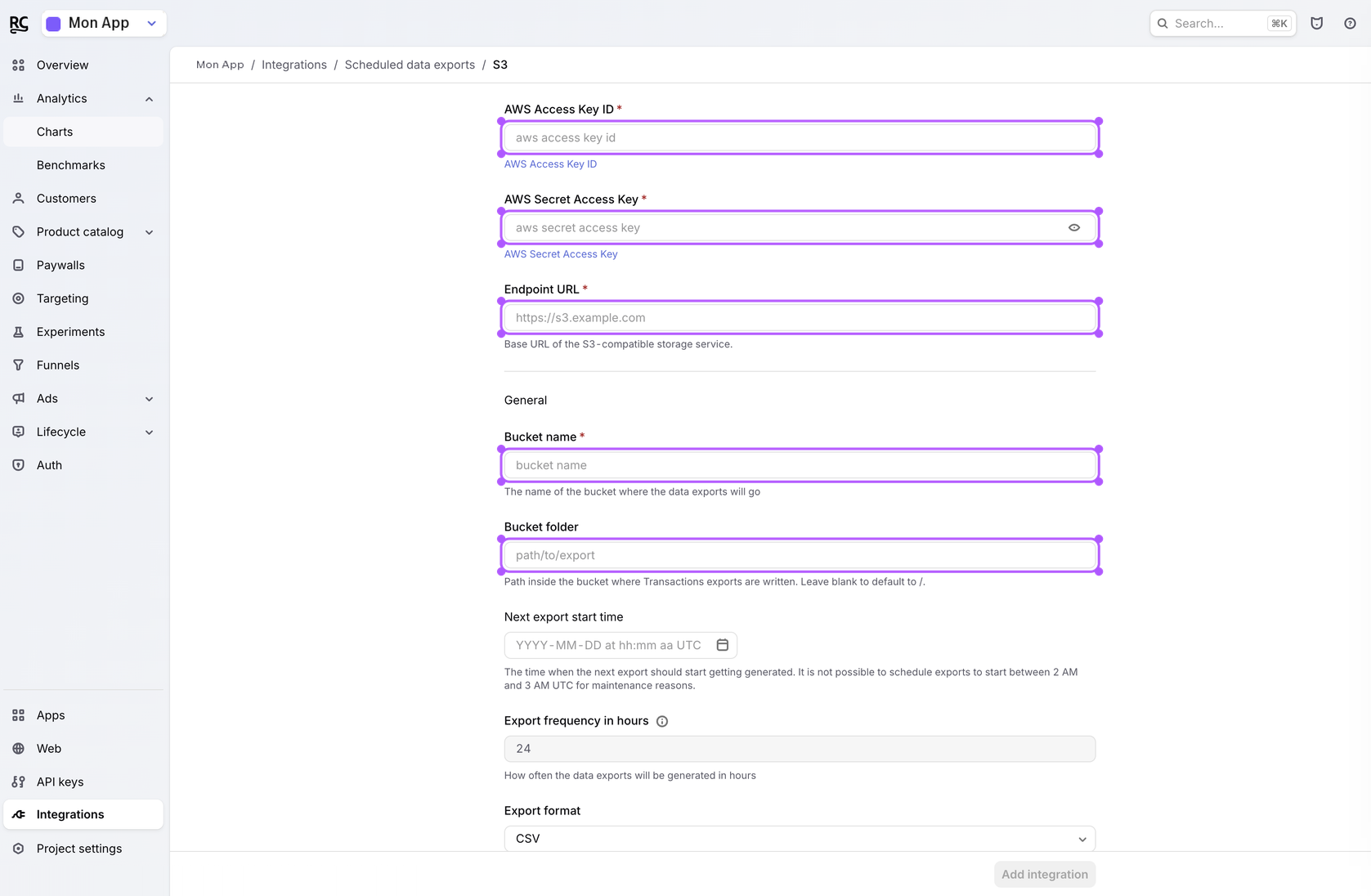
- 5
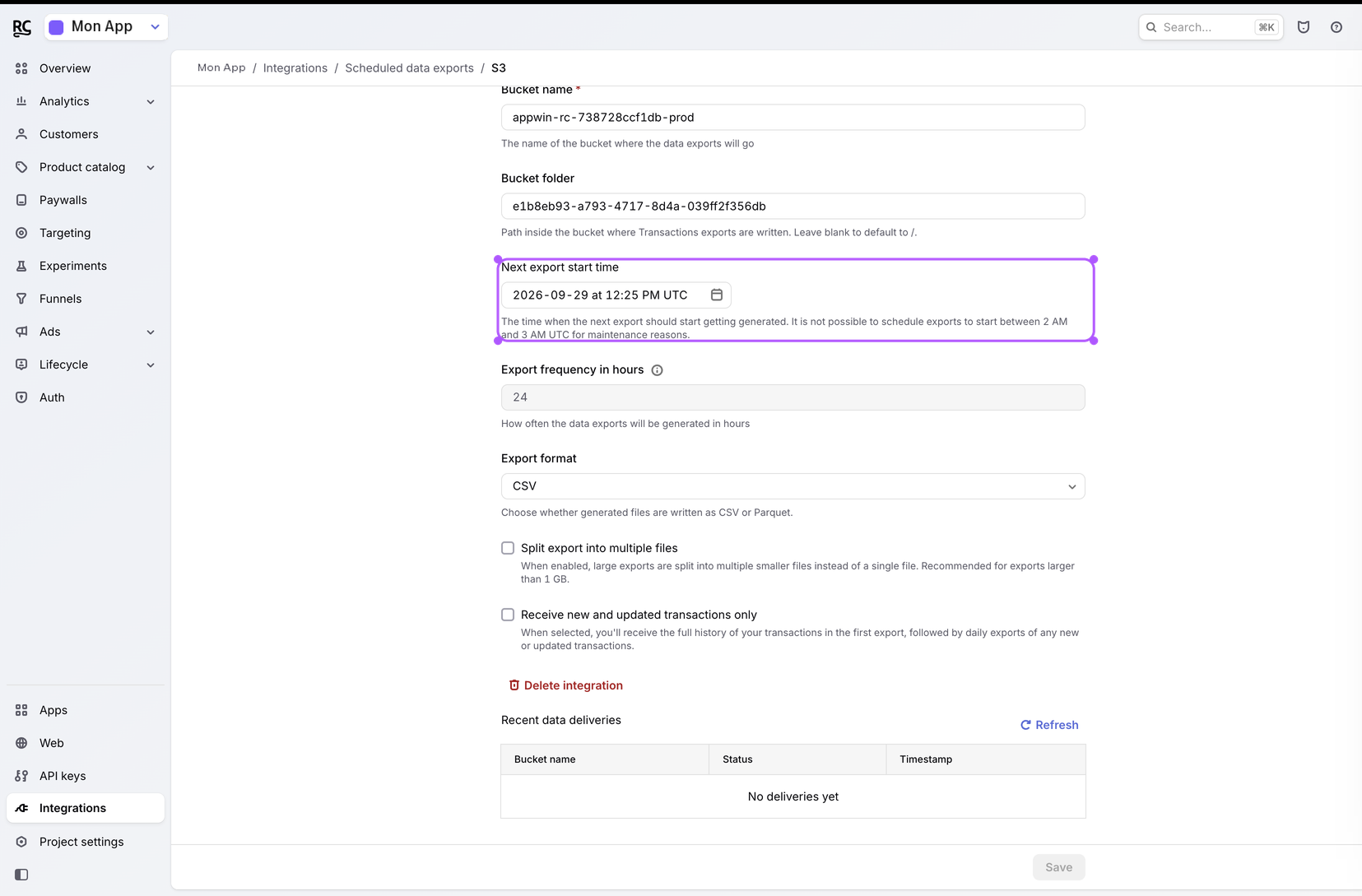
Next export start time
Set Next export start time to now (or soon). Watch AM/PM: the picker is 12-hour UTC. A PM time entered as AM delays the first export by 12 hours.
- 6
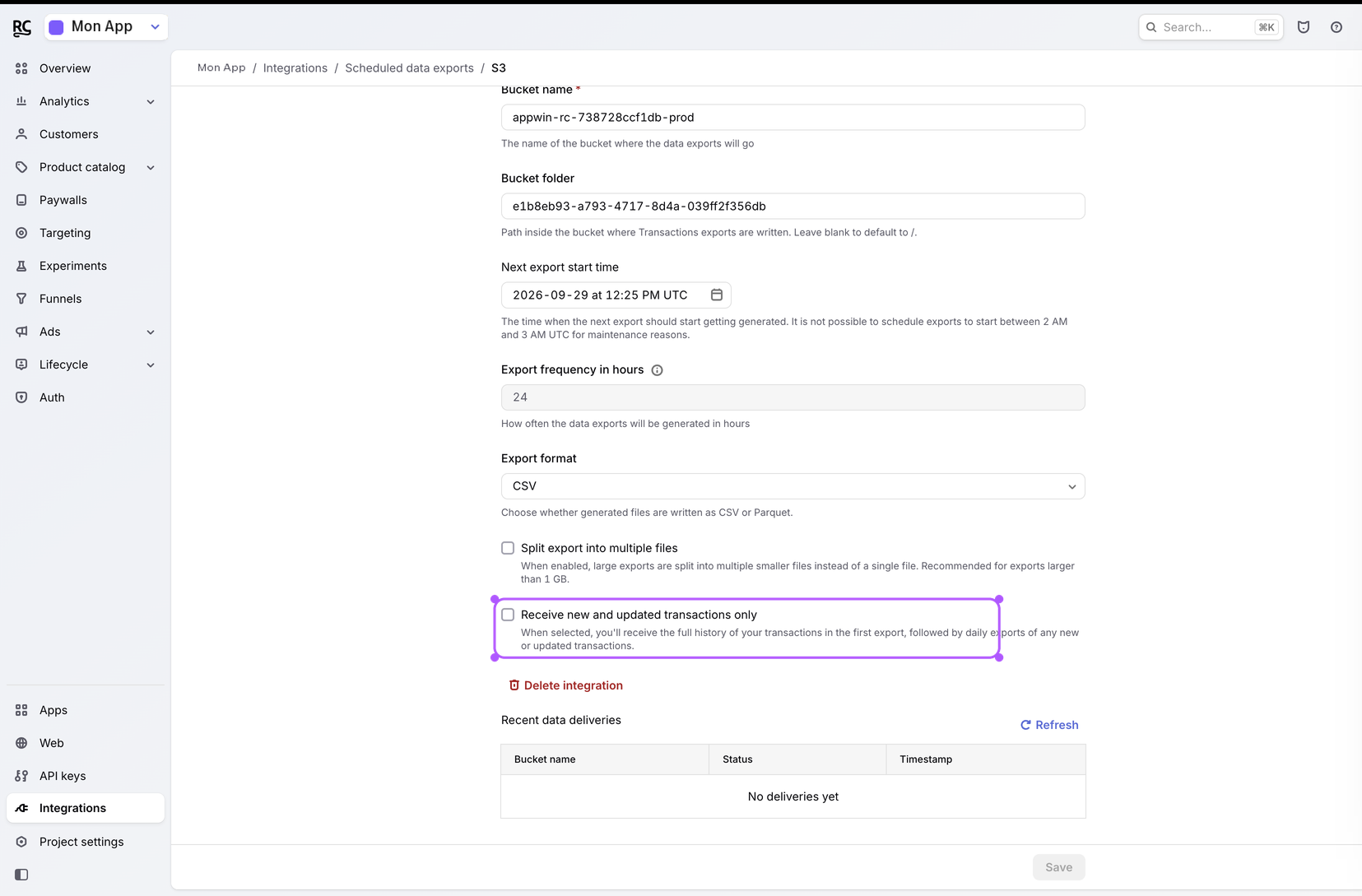
Uncheck incremental-only
Uncheck Receive new and updated transactions only. If it stays on, RevenueCat only sends new events and you get no history.
- 7
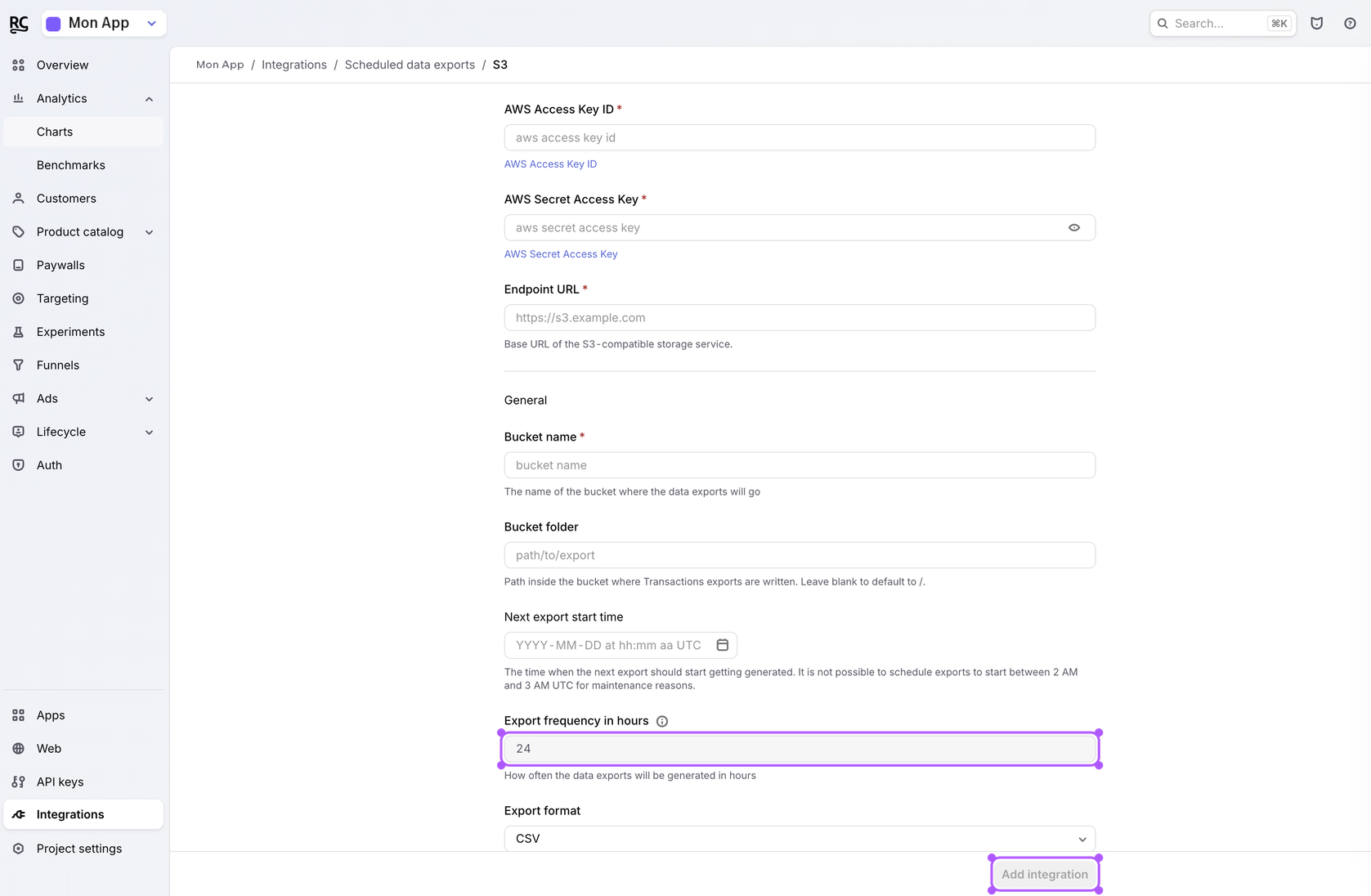
Enable the export
Leave frequency at 24 hours, format CSV, then Add integration.
3. Notifications: subscription_status
Appwin keeps each user's subscription status up to date, even when they never reopen the app. A subscription that expires, gets cancelled or fails to renew changes the user's audience in Notifications and can start an automation.
What keeps it up to date
| Piece | Role | Where |
|---|---|---|
identify() with RevenueCat's user id | Tells Appwin which user a subscriber is | Your app (below) |
| Webhook | Pushes every purchase, renewal, cancellation, billing issue and expiration within seconds, app closed | Step 1 |
| S3 export | Sets the status of existing subscribers, then catches up a webhook RevenueCat gave up on, every day | Step 2 |
Link the RevenueCat subscriber to the Appwin user
Call identify() with the same user id you give RevenueCat with
logIn(). Appwin matches RevenueCat's app_user_id (and its aliases) against
that id.
_ = try await Purchases.shared.logIn(user.id)
try await AppwinCore.identify(externalId: user.id)
Users without an account
If your app sells subscriptions to anonymous users (no logIn(), RevenueCat
id starting with $RCAnonymousID:), there is no shared id. Store the Appwin
device id as the RevenueCat subscriber attribute appwin_device_id instead:
if let id = AppwinCore.deviceId {
  Purchases.shared.attribution.setAttributes(["appwin_device_id": id])
}
What you can target
| Property | Values |
|---|---|
subscription_status | trial, active, cancelled (still active until the end of the period), billing_issue, paused, expired |
subscription_expires_at | End of the current period |
subscription_product | Store product id |
subscription_entitlements | Active entitlements, comma separated |
These properties come from the store: once RevenueCat has filled them for a user, values the app sends for the same keys are ignored.
Automation triggers
With the webhook connected, status changes start automations: Trial started, Subscription started, Trial converted, Subscription renewed, Subscription cancelled, Billing issue, Subscription expired. They can also end a journey early, for example to leave a win-back sequence on Subscription started.
Each trigger reaches every device of the user, as if the app had reported the event.
Existing subscribers
The webhook only sees what happens from now on. The S3 export sets the status of your existing subscribers on its first drop, then refreshes it every day. It does not start automations: it records where people stand, it does not replay their history.
What it unlocks
The Finance metrics fed by RevenueCat:
| Metric | Contents |
|---|---|
| MRR | Monthly recurring revenue |
| ARR | Annual recurring revenue |
| Revenue | Revenue collected over the period |
| Churn | Attrition rate |
| Active subscribers | Active subscribers |
| Refund rate | Refund rate |
| LTV per customer | Average lifetime value |
| New trials | Trials started |
| Trial conversion rate | Trials converting to paid |
| New customers | New customers |
Each shows as a single value or as a time series, over the periods the product offers (7 days to 1 year, MTD, QTD, YTD, previous month/quarter/year).
Freshness
| Channel | Typical delay |
|---|---|
| Webhook | Near-instant after the event at the stores |
| S3 export | Daily once the export is on; the first drop can take longer |
Dashboards may still cache an already-computed aggregation for a few minutes: refreshing a page does not necessarily recompute everything.
Troubleshooting
| Symptom | Likely cause |
|---|---|
| No new purchase shows up | Webhook not saved, wrong URL, or secret without the whsec_ prefix |
| Empty history, live feed OK | S3 drop not created, Scheduled Data Exports off, or Receive new and updated transactions only left checked |
| 401 on RevenueCat's side for the webhook | Wrong secret, or auth other than Authorization header |
| Empty Finance page | No data received over the chosen period |
| Bucket folder rejected | You invented a folder: use the project id shown in Appwin |
| Status never set | identify() called with a different id than RevenueCat's logIn(), or anonymous user without appwin_device_id |
| Status set, no automation started | Webhook not connected (the S3 export alone sets the status but starts nothing), or the automation is not active |
| Status reverts after an app update | Your app writes subscription_* attributes itself before RevenueCat filled them: stop sending them |
Next
- Finance - what the product does with these figures
- Notifications - audiences and automations on the subscription status
- Adjust - the spend side, to compare cost and revenue